Korean Multi-Purpose Satellite (KOMPSAT)
The routines in this module (kompsat) can be used to load data from the GEO-KOMPSAT-2A satellite.
Server authentication
Data resides in the ESA HAPI server. This server requires authentication. The user should register at:
[ESA registration](https://swe.ssa.esa.int/registration/)
Once registered, the user should should have a username and password. These should be used in the file:
file: pyspedas/compsat/load.py
variable: esa_hapi_parameters
After doing this, the user should be able to download data from the ESA HAPI server.
To download data, use either the function kompsat.kompsat_load or the synonymous function kompsat.load.
Instruments
The load() variable “instrument” can take three values:
‘sosmag’ or ‘mag’, for magnetometer data (default, it is optional for ‘sosmag’)
Magnetic Field Data with 1-16Hz from SOSMAG on GEO-KOMPSAT-2A in geostationary orbit at 128.2E.
‘e’ or ‘electrons’, for electron flux
1-minute averaging electron flux data from the particle detector on GEO-KOMPSAT-2A in geostationary orbit at 128.2E.
‘p’ or ‘protons’, for proton flux
1-minute averaging proton flux data from the particle detector on GEO-KOMPSAT-2A in geostationary orbit at 128.2E.
Example
# Import from pyspedas
import pyspedas
from pyspedas import tplot, options

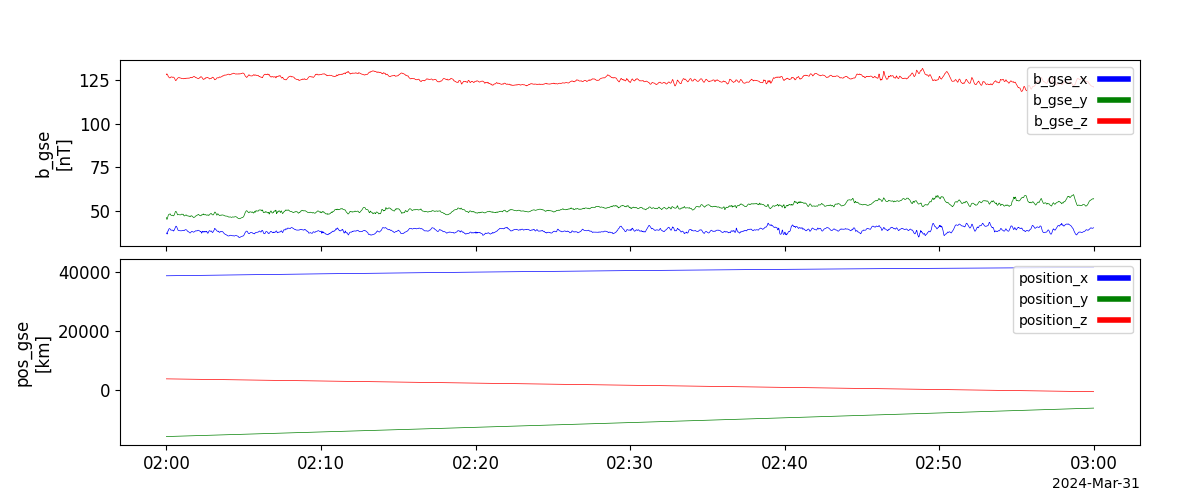
# Load L2 magnetometer data and plot it
var_names = pyspedas.projects.kompsat.load(trange=["2024-03-31 02:00:00", "2024-03-31 03:00:00"], datatype="1m")
tplot(var_names)
# Load electron data and plot it
var_names = pyspedas.projects.kompsat.load(trange=["2024-03-31 02:00:00", "2024-03-31 03:00:00"], instrument="e")
options(var_names, 'ysubtitle', '')  # remove subtitles (units)
tplot(var_names)

# Load proton data and plot it
var_names = pyspedas.projects.kompsat.load(trange=["2024-03-31 02:00:00", "2024-03-31 03:00:00"], instrument="p")
options(var_names, 'ysubtitle', '')  # remove subtitles (units)
tplot(var_names)

Load function (SOSMAG and particle )
- pyspedas.projects.kompsat.load(trange=['2024-03-31T01:00:00.000Z', '2024-03-31T01:30:00.000Z'], datatype='recalib')[source]
This function loads data from the ESA HAPI server.
- Parameters:
trange (
listofstr) – Start and end times. Many time formats are supported, see function time_double().datatype (
str) – Data type selector. For SOSMAG data, use “recalib” (default) for recalibrated L2 data or “1m” for near-realtime 1-minute data. For KSEM particle data, use “p” for protons or “e” for electrons. Any value except “p” (“protons”, “proton”, “p”), “e” (“electrons”, “electron”, “e”), and “1m” (“1m”, “1min”, “realtime”]) will be treated as “recalib”.
- Returns:
var_names – Names of tplot variables created.
- Return type:
Examples
>>> from pyspedas import tplot
>>> from pyspedas import kompsat_load
>>> # Plot L2 magnetometer data
>>> var_names = kompsat_load(trange=["2024-03-31 02:00:00", "2024-03-31 03:00:00"])
>>> tplot(var_names)
>>> # Plot electron data
>>> var_names = kompsat_load(trange=["2024-03-31 02:00:00", "2024-03-31 03:00:00"], datatype="e")
>>> tplot(var_names)
>>> # Plot proton data
>>> var_names = kompsat_load(trange=["2024-03-31 02:00:00", "2024-03-31 03:00:00"], datatype="p")
>>> tplot(var_names)
Notes
Data links that can be tested on a browser:
SOSMAG data:
Particle data: