Space Technology 5 (ST5)
The routines in this module can be used to load data from the Space Technology 5 (ST5) mission.
Magnetometer (MAG)
- pyspedas.projects.st5.mag(trange=['2006-06-01', '2006-06-02'], probe='094', datatype='1sec', suffix='', prefix='', get_support_data=False, varformat=None, varnames=[], downloadonly=False, notplot=False, no_update=False, time_clip=False)[source]
This function loads data from the Magnetometer (MAG)
- Parameters:
trange (
listofstr) – time range of interest [starttime, endtime] with the format ‘YYYY-MM-DD’,’YYYY-MM-DD’] or to specify more or less than a day [‘YYYY-MM-DD/hh:mm:ss’,’YYYY-MM-DD/hh:mm:ss’] Default: [‘2006-06-01’, ‘2006-06-02’]probe (
str) – Probe #; Valid options: ‘094’, ‘224’, ‘155’ Default: ‘094’datatype (
str) – Data type; options: ‘1sec’ Default: ‘1sec’suffix (
str) – The tplot variable names will be given this suffix. Default: ‘’, no suffix is added.prefix (
str) – The tplot variable names will be given this prefix. Default: ‘’, no prefix is added.get_support_data (
bool) – Data with an attribute “VAR_TYPE” with a value of “support_data” will be loaded into tplot. Default: False. Only loads in data with a “VAR_TYPE” attribute of “data”.varformat (
str) – The file variable formats to load into tplot. Wildcard character “*” is accepted. Default: None. All variables are loaded in.varnames (
listofstr) – List of variable names to load. Default: []. If not specified, all data variables are loaded.downloadonly (
bool) – Set this flag to download the CDF files, but not load them into tplot variables Default: Falsenotplot (
bool) – Return the data in hash tables instead of creating tplot variables Default: Falseno_update (
bool) – If set, only load data from your local cache Default: Falsetime_clip (
bool) – Time clip the variables to exactly the range specified in the trange keyword Default: False
- Return type:
Listoftplot variables created.
Example:
>>> import pyspedas
>>> from pyspedas import tplot
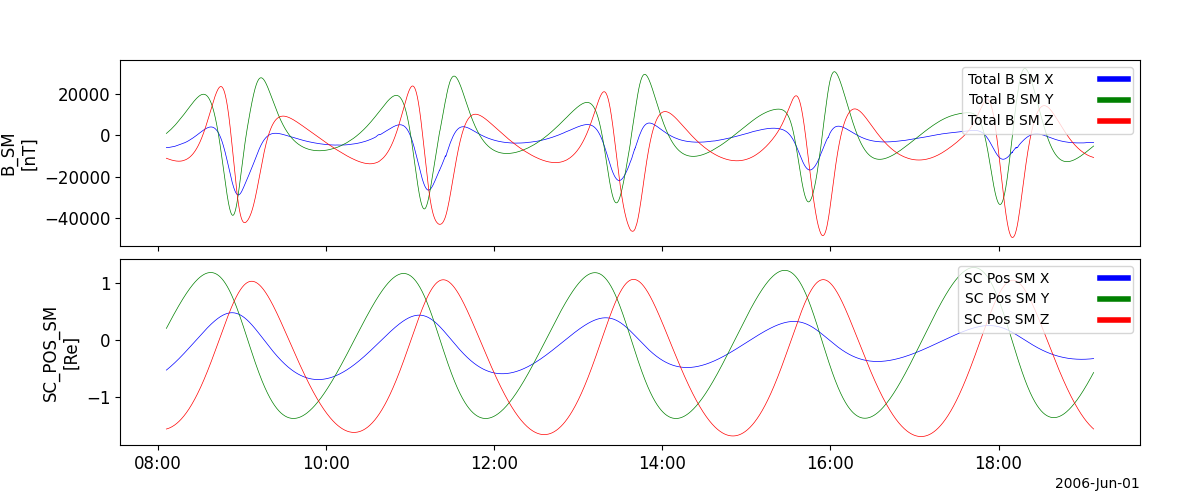
>>> mag_vars = pyspedas.projects.st5.mag(trange=['2006-06-01', '2006-06-02'])
>>> tplot(['B_SM', 'SC_POS_SM'])
Example
import pyspedas
from pyspedas import tplot
st5_vars = pyspedas.projects.st5.mag(trange=['2006-06-01', '2006-06-02'])
tplot(['B_SM', 'SC_POS_SM'])